


Placing an order
Secure ordering
Ordering gold and silver online at Hollandgold is easy. All our prices are automatically adjusted to the current rates, so you always order at the current price. You can place an order with or without an account. The ordering process is explained step by step below. Customer service is available if you need help while ordering.
Step 1: Select product.
Place your chosen product in your shopping cart by pressing the orange button: ''Add to cart'' (A)

Step 2: Add to cart
When you have selected all products, you can go to your shopping cart by clicking on the ''Add to cart'' button (B). In the shopping cart you will find all the products you intend to purchase. If you have not yet selected all the products you want, you can continue shopping by pressing the button ''Continue shopping'' (C).

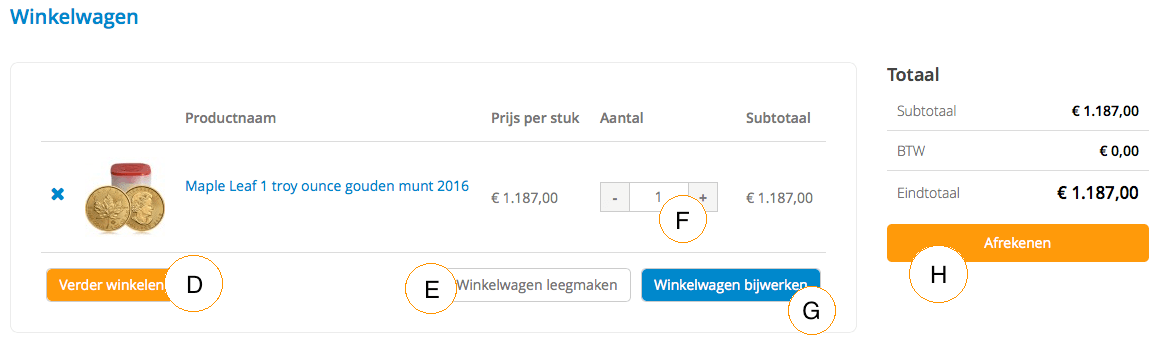
Step 3: Shopping cart
When you're in your cart, you have a couple of choices before proceeding to the checkout step.
- select D: if you want to continue shopping
- select E: if you want to empty the shopping cart
- select F: if you want to change the number of products
- select G: if you want to 'update' the shopping cart
- select H: if you want to checkout
Step 4: Details
Of course, we need to know what your data is.
- fill in your personal details at I
- choose the desired shipping method at K
- choose the desired payment method at L
- enter the discount code at M
- accept the general terms and conditions at N
- confirm the order at O

Order number
After the order has been placed, you will receive an e-mail with a confirmation of your order. This e-mail will contain your order number. If you have any questions about your order, we will ask you for the order number.
Order by phone
You can also place your order by phone. We can be reached by phone from Monday to Friday from 09:00 to 17:00 on 088 4688 400.


